My Awesome followers!

Showing posts with label cards. Show all posts

Tuesday, February 1, 2011

Tuesday Tutorial! Embossing & Color Pencil Tutorial.

Hello again everyone thanks for stopping by for my Tuesday Tutorial!
I am busy  preparing for the bad snow storm at the moment
 so this is a bit later than I orignally planned Sorry!
Yesterday I shared my Dilek Cute panda bear  card 

which is what I am going to  use as my tutorial card...
 For this project  I am using Prisma Colored Pencils...
I love this particular brand so much.
All the pencils give you a really good quality color coating &
 are fabulous to blend together with a clear blender pencil.
I don't know what other pencils give you as good a quality final image  because 
I have always used these no need to  try others when your happy with what you have. ;)

 If you want to  shout out what colored pencils you like to use then add a comment and I will add the suggestions to the instructions for future readers! =D
Thanks!
~~~~~~~~~~~~~~~~~~~~~~~

For this project I first used my Cuttlebug dry embosser to emboss my card topper (simple cardstock)
First  measure the card &  topper to fit the embossing folder you are using.
 Make sure the cardstock fits the embossing folder
Next Place the cardstock topper in the embossing folder
Then place your embossing folder in between the Cuttlebug plates
For embossing folders sandwich stack is ( Plate A , Plate B Embossing folder, then Plate B)
If you use thin paper then you  may also need to place a shim to make it thicker.
Place the stack in the Cuttle bug then roll it through. Sometimes you have to give it a shove as you  go. =D
Next You get to color! Yay!
Now  to start off you will need your colored pencils & a clear blender pencil.
(some people use Gamisol or baby oil to blend as well)
I started out coloring the raised embossed cardstock design
with the lightest color first.
You  are just  going to  color the part that you want to be the lightest  part
 of the final design.
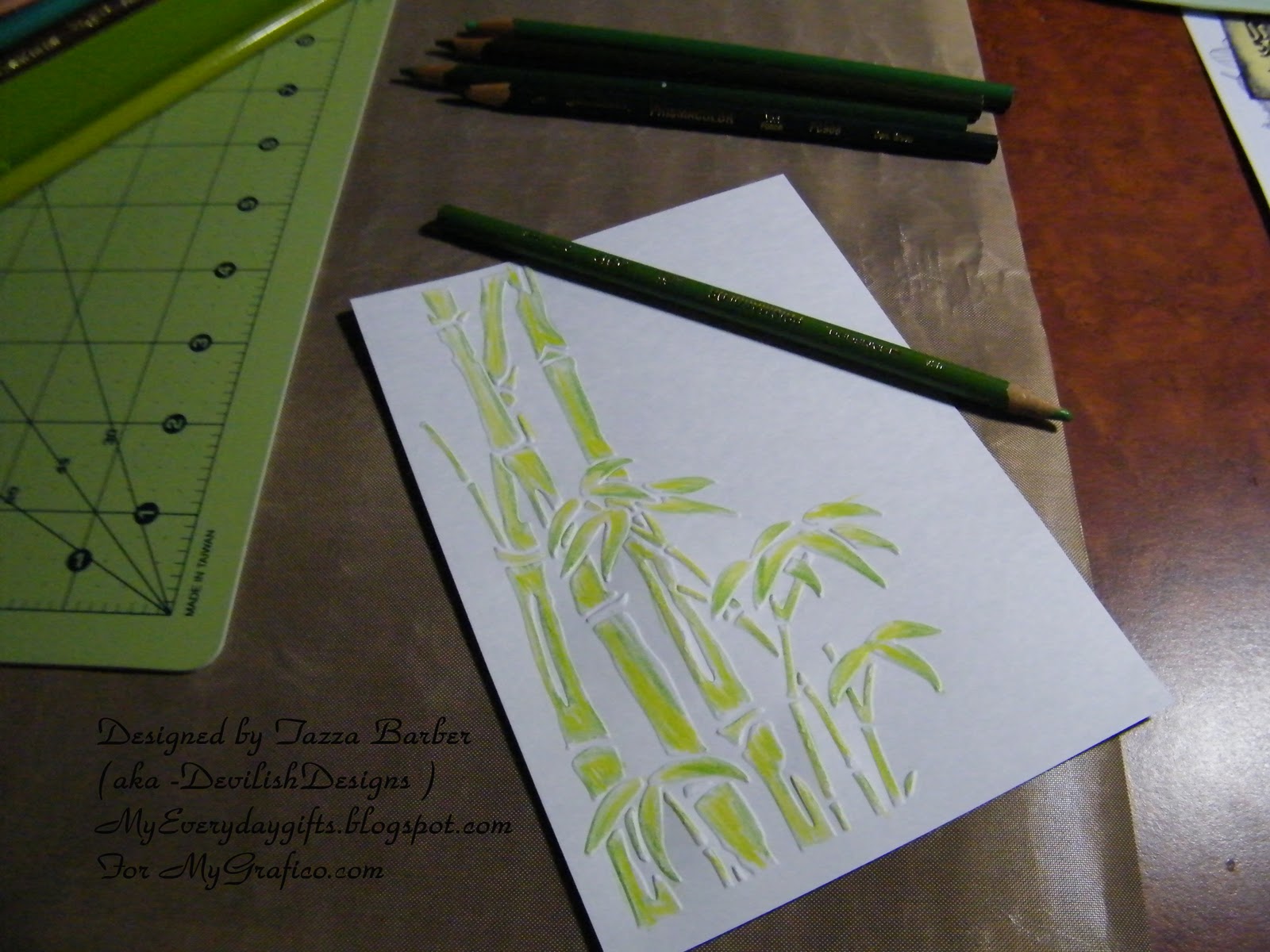
Next move on to the next darker color in the color and pencils you have chosen.
You want to color how you want the dark shading to show.
keep going with the next color in the shading in your color group.
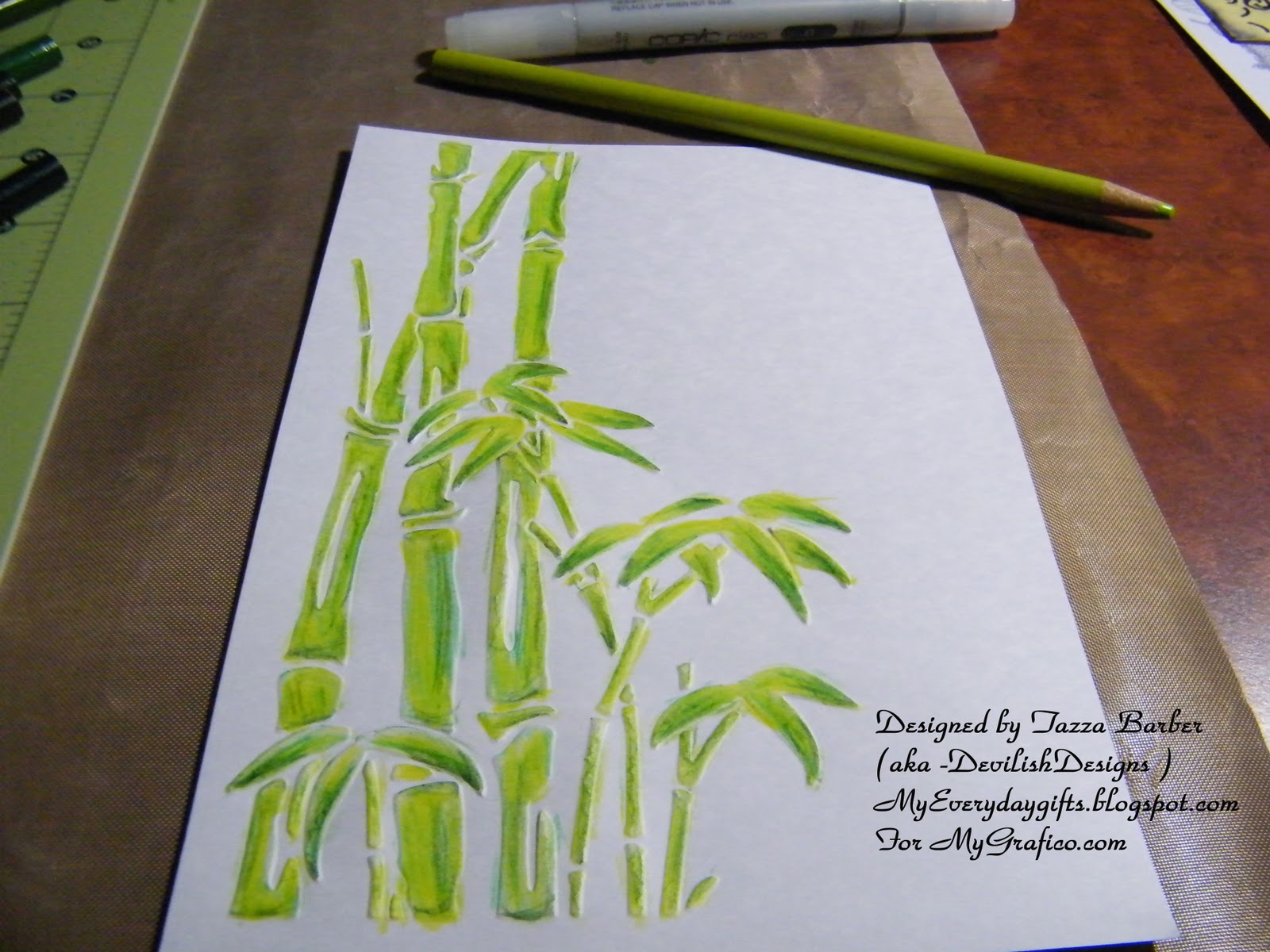
As you can see  the bamboo is starting to look very good with highlights & low lights.
I like to play around till I like how the colors look together.
but I always go light to dark  you can always go darker but it is hard to go back to lighter.
you can  use your lighter pencils to blend the colors together or use the
clear blender pencil ( or gamisol or baby oil)
when your done  with all the colors just go over a few of your darker spots a bit check that you haven't missed a spot you want colored  then...
go back over the whole image with the clear blender pencil  to  blend and smooth the colors together for
a final time to  clean up any  missed sections or rough edges...
Then your off to start the next part which is for me the Panda bear...
now I just colored it with Black really dark and no shading but if you wanted to have shading you  would use you lighter colores such ans white and greys first...
You can see my final panda here...
After I colored the panda I mounted it to the card  with some raised foam tape.
then added some Viva Decor glass effect gel to the leaves to add some interest.
I also stamped the autumn leaves sentiment to the side & layered the card topper on some black cardstock to give it a bit more definition.
Once again the final result.


OK  so that  is it for this tutorial today!
I hope to cover more coloring tips and techniques soon!
Hope this has inspired you to pull out those coloring pencils and  color to your hearts content!
 Don't forget to join our new Anything goes Challenge!
 A whole month of anything goes ! whoohoo!
Just add your entry  link to the linky tool  at the top of the page!
Thanks and have a Great Day!


Sunday, January 30, 2011

Rory turns 2 & a Guy Valentine's Day card!

Good Morning!
Today is Rory's 2nd  Birthday so we are heading to Chucky Cheese
 for some lunch & lots of fun later.
He already received his gifts from Mommy, Daddy & Griffin which he is very excited about...
He received a Cars (Lighting McQueen) ride on , 2 sets of the Disney cars die cast,
& a Little Tikes Car bed! 

~~~~~~~~~~~~~

I have been  busy working at  my desk making lots of special cards
& one of them is this one for valentine's day for a guy...
I don't know about you but Guy cards are kinda harder for me to  do because (most) guys
don't want a frufru girly glittery floral kind of card... LOL
Soooo I went for a Clean and simple style card  made with
it's only $5.00! and has some really cute images on it.

I hand wrote the sentiment.. ( yes I know I  need to work on  my Penmanship! LOL) ,
colored with Prisma pencils, & added some stickles to the corners to add a tiny but of embellishment.
Thanks for looking !


Don't forget to add any  of your projects to the Anything Goes Challenge at MyGrafico! Challenge is open till the 31st, Winners will be announced that Wednesday! The more people to enter the more prizes!


Wednesday, August 4, 2010

Mygrafico Challenge #60

Hi Again!
Thanks for stopping by for MyGrafico's Weekly Wednesday Challenge!
your in for a treat today...
This week our Challenge is
Vintage.. so add some vintage appeal or distress your edges with ink or with a tool.. whatever you think looks the vintage part... have fun and happy crafting!


This week the team worked with the


you could win this set all to yourself!
and
the winner gets a Saturday spotlight feature!
I just love this set the flowers are so lovely...


A Great perk to this set is that they are also Brushes! Whoo Hoo!
Love, love, love... that!


**EDIT**

Here is my Card... Hope you like it!

I distressed edges slightly with charcoal ink &
 distressed the orange cardstock with the Tim Holtz tool.

I used my copics to color the stamped image
 and then to get the mottled sky I used a blender pen and
dotted the area I wanted to be softened.
This is a very forgiving technique that anyone can do.

I  stickled the flowers and the sentiment is from TLC Creations.. link to store... 
or the blog... TLC Creations


Stop on by the Design teams  Blogs to see what they have come up for this weeks Challenge.
I know you will love all of them... Fabulous stuff I have to say.

Visit the NEW Challenge blog  to link your card to the LINKZ ...
 you can have a chance to win a guest Design team spot! 
See you there!  

Monday, July 19, 2010

Frog Prince Card & a Freebie!

You have to kiss a lot of Frogs to find your Prince...


You got that right ! =D
Well you  might have to kiss one or 2 anyway.. =P

~~~~~~~~~~~~~~~~

Hello again & Thanks for stopping by my blog today!

 I have a bunch of projects in the works but for today a super cute card
Featuring
Primsy Doodles


 I had a fun time making this Card,
First I love FROGs
Second ..It has my all time fav colors in it..
Well it is missing  the Turquoise Blue..
But the Green and pink are there! so we are good .
 =D


I just love this little frog...
I colored all the green with my Prisma markers and then used my copics for the rest.
I added a few bits of bling to the top and bottom corners to help add what I was perceiving as a bit boring card.. hahaha.. I just can't not add bling or stickles! it's a sickness I tell ya!


Popped this guy up  for a bit of dimension
I layered several different cardstock colors for the mats  
 then used a lovely Green Patterned Paper as my  background.


I whipped up the sentiment on my computer to fit the card &
used some "trash" from a corner punched from the 3 dot scallop Martha Stewart as my corner frame pieces.
I used a little bit of stickles on them to give them a bit more pizazz . and on some highlights on my frog.

If you would like the freebie sentiment just click on the photo and right click and save as


Check back for a freebie SVG  &  MTC  file on Thursday with a super cute altered item project  =D
Thanks for stopping by!

This card is entered into the following challenges...

Stamp, Scrap & Doodle Saturdays Challenge found HERE (Theme is animals)
The Pollycraft Monday Challenge found HERE (Theme is Bold & bright)
For Fun Challenges found HERE (Theme is Colored Images)
Stampavie and more found HERE ( Theme is Anything goes)
Sweet Stampin Challenge Blog found HERE ( Theme inspiration photo - I was inspired by the colors.. the green , pinks and the striped bunting )
Stamp Something  found HERE ( theme somthing digital)


Thanks for the chance to win!  

Tuesday, February 9, 2010

MyGraficO challenge # 35

A day late due to my new pc not having everything installed so I could upload my new creations...

for this Mygrafico challenge the team was asked to create something with the colors
 Pink, Olive Green, & Brown

I have to say this was a bit of a challenge for me at first 
I just couldn't find any Olive Green or Brown paper in my stash.
I guess that means I need to get more stuff! =D
I did eventually find some pieces from a scrap pack I bought a while ago.

the Stamp set we had to choose from was...Keys to my Heart by Sara Paris


Hope you all like the card I made...


Thanks for looking!
 &
 Don't forget if you play along you could win this set!
All you have to do is upload your project link using the colors pink olive green & brown to the Mygraficochallenge blog in the challenge #35 post and your entered to win! Yay!   You can also play along tomorrow for the Wensday DT blog hop so join that too!

Details:
 Stickles - gold, candy cane pink,  and diamond
Papers- Misc from scrap pack
Digital stamps- Keys to my Heart - by Sara Paris  found at MyGrafico.com
Cuttlebug Embossing folder- mesh
 I cut the embossed heart's edges to make fringe, stickled all the edges to finish them and made hearts along the outer edges of the card.


Sunday, January 24, 2010

Scrapbooking & Crafting Friends Design Team Challenges

Hi again !
I got busy and didn't get a chance to post these till now.  Sorry about the wait  But I hope you enjoy!   

 DT is Sponserd by MyGraficO and the Images we used are from this Great set
Perfect for Valentines Day!


The Challenge for the Altered Go Green/Machines Design Team
was Cake/Cupcake


Additional details :
Colored with Prisma markers
Embossed with Embossing powder & Glitter

Punches = Swiss Cheese (EKsucess) & Cupcake (Miss Elizabeth)
 Stampin up orchard opulance inked edges
Stickles=Various colors


The Mini Projects Team  Challenge was Cherries/Cherry
Once again the same stamp set was used


Additional Details :
Colored with Prisma markers,
Glitter mist = lime green
Edges inked with Martha Stewart ink,
Various ribbons from stash,
Martha Stewart punch around the page three dot scallop


For the Card Creation Team Challenge
we had to use Hearts & the colors Red / Purple
&


Additional Details :

Colored with Prisma markers
Stickles=Various colors
Punches = Martha Stewart Punch around the page Rings & Various Heart punches
Alpha Brad 
Cuttlebug folder = animals
Thanks for stopping by don't forget to stop by tomorrow
 for the MyGraficO Design Team Hop!
I have a Super Cute Mini Album to share & a Adorable Card
I'm sure you will likey!=D
See you then!

Monday, January 11, 2010

MyGraficO Design Team Challenge #31 Project

Hello Everyone!

For this Design team challenge  and for the Blog Hop found HERE
We were asked to used the color Yellow and this great digital Stamp set from Blackleaf .


I made a Birthday card for my 3 year old son who is madly in love with SpongeBob Squarepants


 I loved the stars, I have so many Ideas for using this set ... I love stars!
   I'm sure you will love this set as much as we all do,  make sure you visit the rest of the Design Team on this blog hop & make a comment on each of their projects  
Enjoy!
Team A-Color Challenges
          Jennifer  Lynn  Nancy  Rachel  ( Stephanie - Challenge Coordinator) - Jacquie  &  me Tazza


Additional Details:
I doodled some fun designs on some punched stars  from several different makers
I also used the Sizzix Texture Boutique with the Happy Birthday Cuttlebug Folder for my background.
I was excited to use the SpongeBob SquarePants Cricut Cartridge
( I won it from ProvoCraft on Twitter with one of there Cartridge Giveaways on Christmas eve.)
 This was the first time I had used it and Boy oh Boy ...
I love it but geez it has some tiny cuts!
 I made him at 3" but next time I will make my cuts bigger because
  some of the cuts were lost due to the size .


Thanks for looking and make sure you stop by the others on the design team and show some love for their projects and the Stars Stamp set !

& Remember you have a chance to win this set too !!!
to play along, simply add your link to Simply LInked by 10Pm PST on Sunday night.


                                                  Winners will be announced Monday.

When uploading to PCP/SCS or MyGrafico ning use keywords MG31
Submit your link:
Link Title:
Email Address: (not displayed)
URL:
Accepted links may take a few minutes to appear